Managing and Editing .md Documents
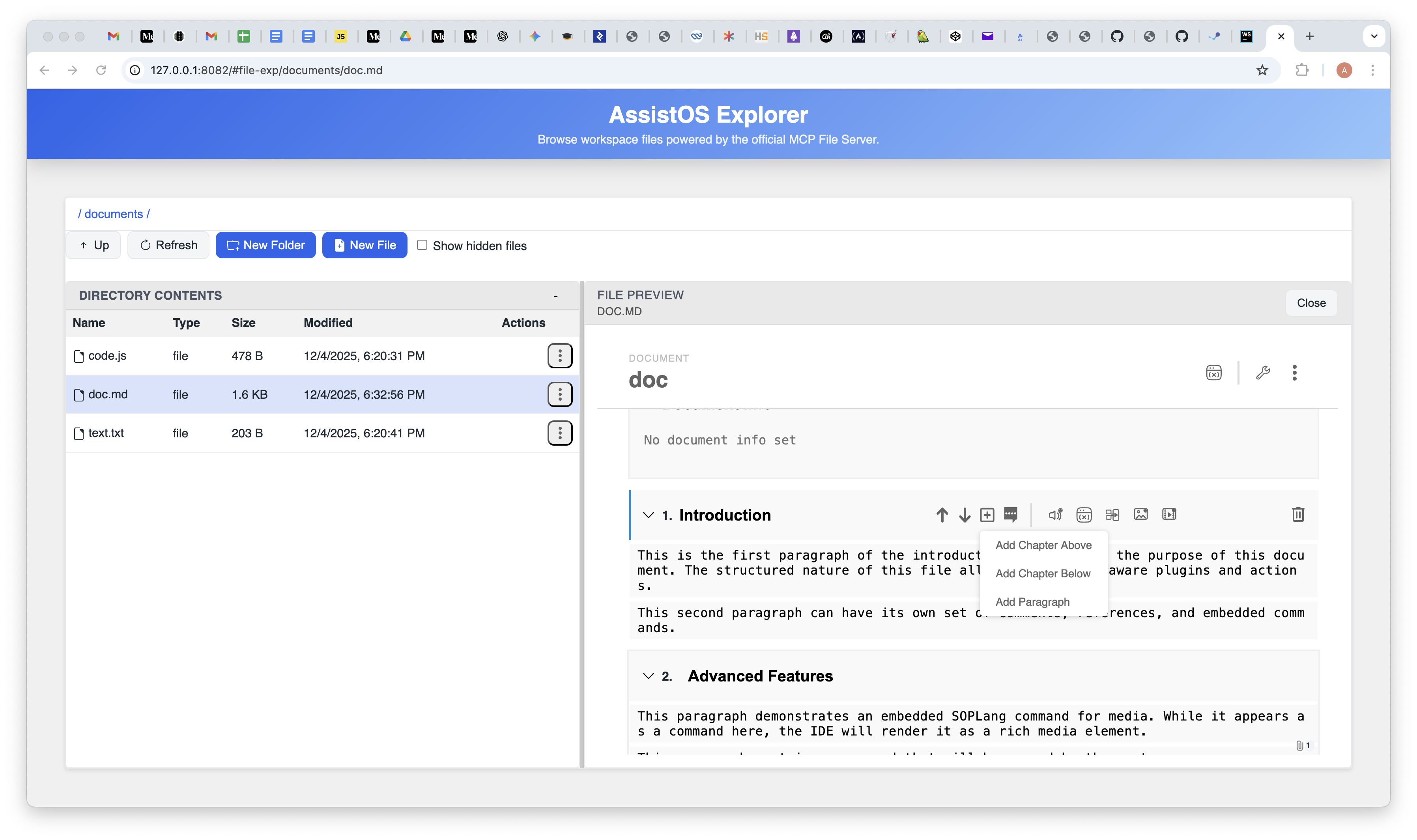
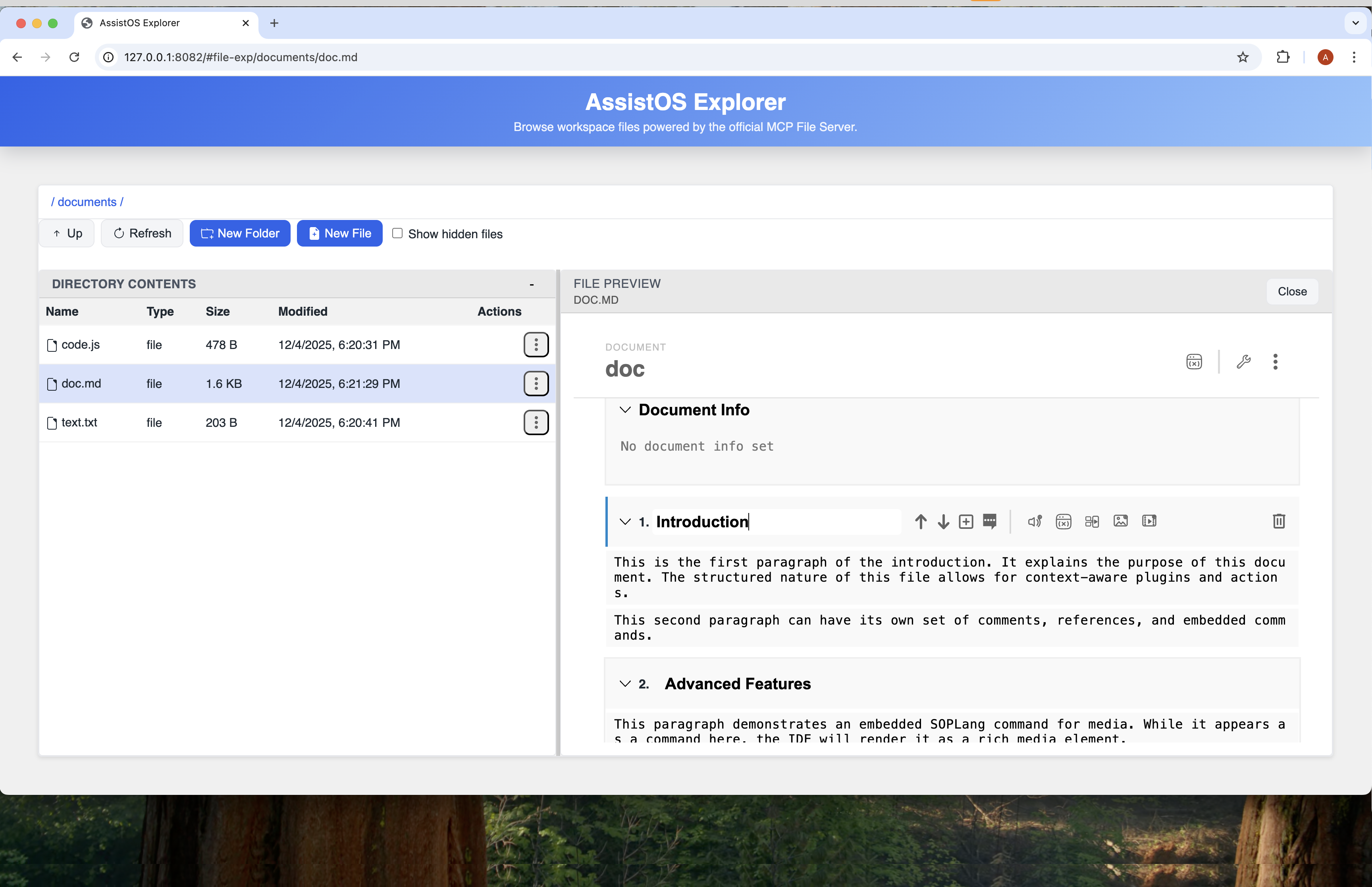
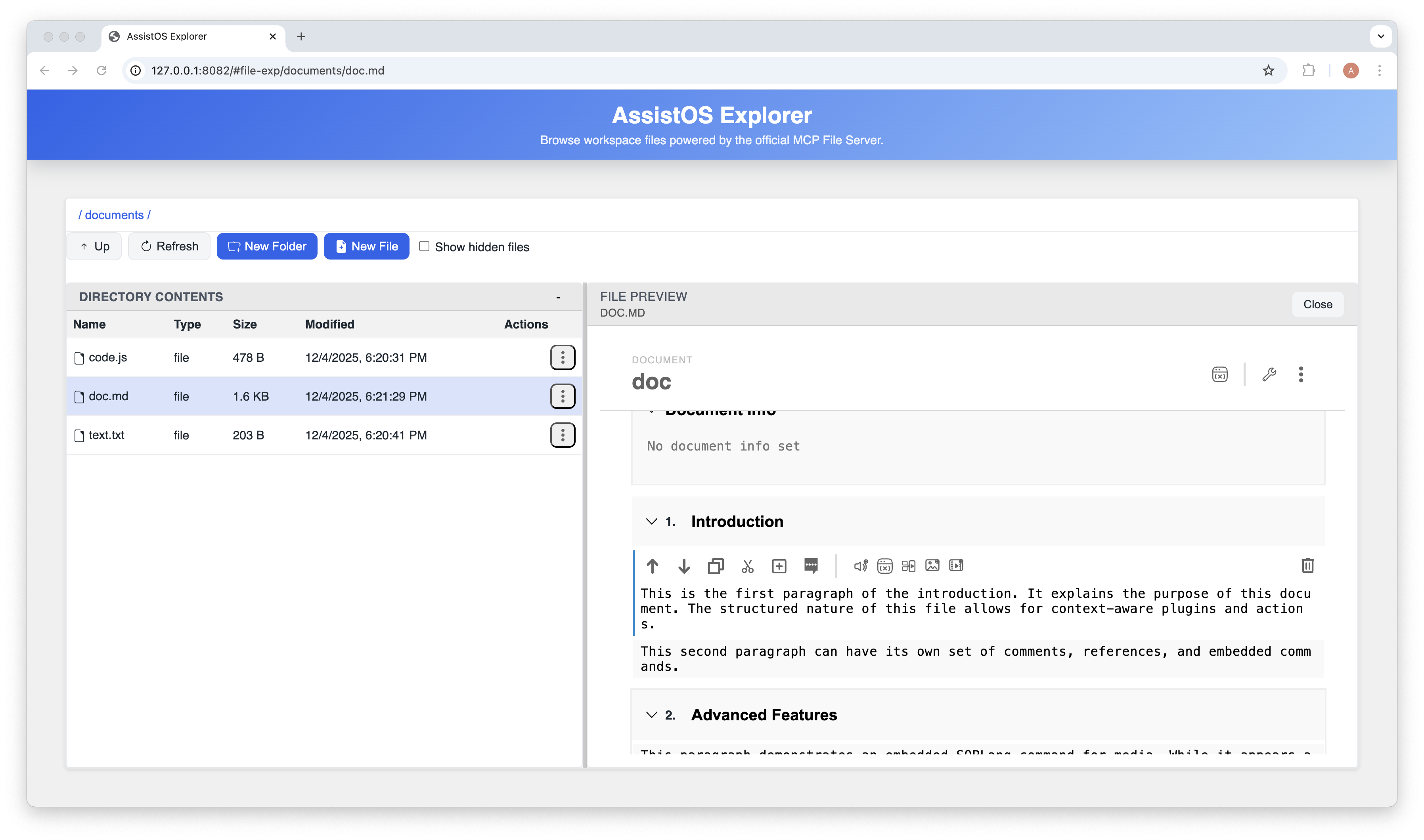
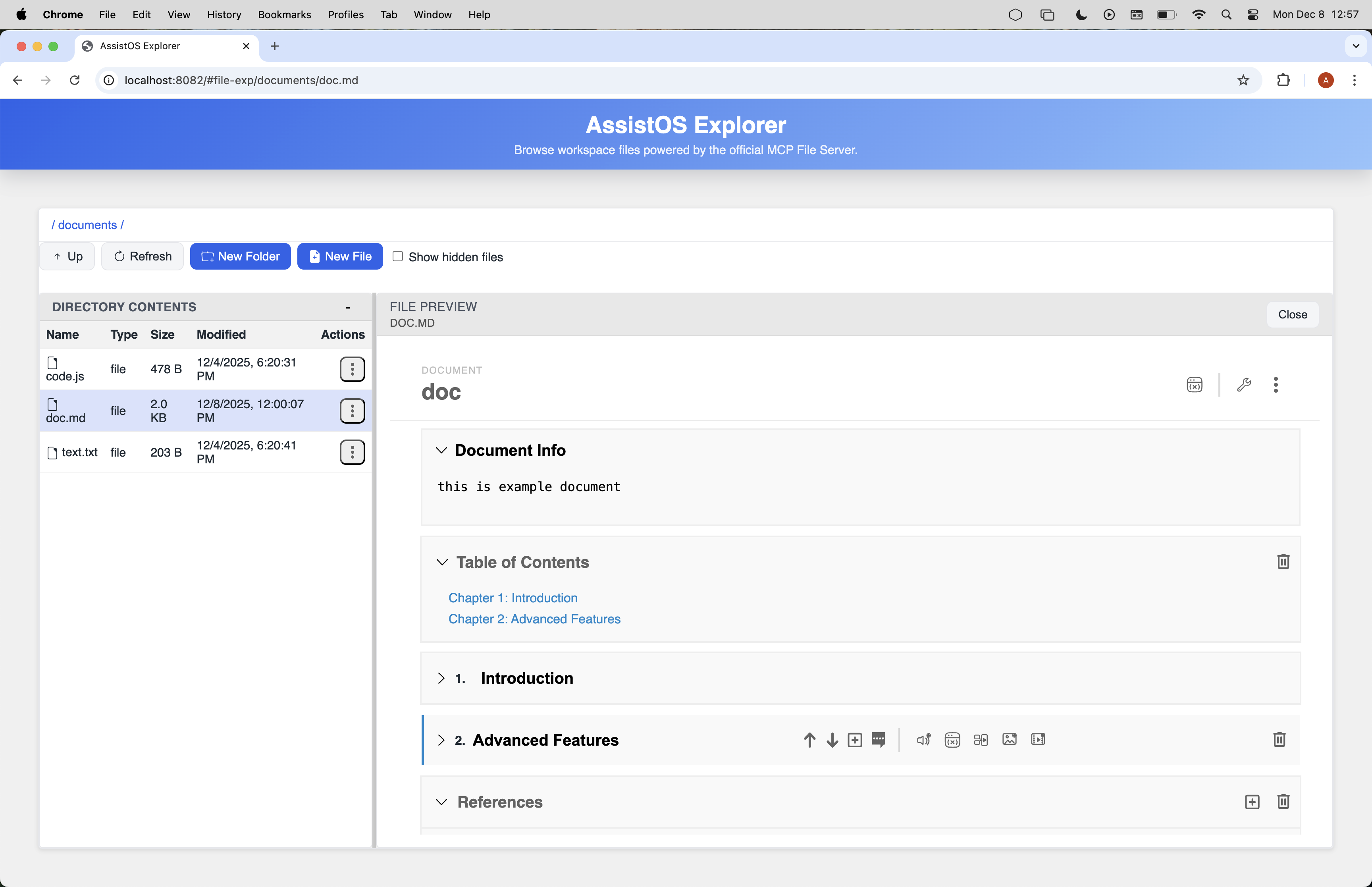
A core feature of the Explorer agent is its specialized handling of Markdown (.md) files. Instead of treating them as plain text, Explorer parses them into a structured Document Object Model (DOM), turning them into interactive, extensible documents with a rich set of features. Any file, however, can be opened in view or edit mode: Markdown gets the structured document experience; all other text/code files use the general editor.
Editor capabilities (Markdown documents):
Add/reorder chapters: Insert new chapters and rearrange them to reorder; anchors and IDs stay in sync.
Add/reorder paragraphs: Insert paragraphs within chapters and rearrange them while keeping paragraph IDs and commands aligned.
Edit titles & metadata: Update the document title/info text, chapter titles, and paragraph titles/commands without losing structure.
Delete content safely: Remove chapters or paragraphs while related metadata and comments are updated on save.
Comments & references: Add comments at document, chapter, or paragraph level and manage references inline.
The Document Data Model
When a Markdown file is loaded, it is transformed into a rich, in-memory representation. This process, known as hydration, is handled by the DocumentStore service. The hydrateDocumentModel function enriches the document with metadata, comments, references, and other structured data, creating a hierarchical model that the UI components can interact with.
Example: A file with <!--{"achilles-ide-document": {"id": "guide", "title": "My Guide"}}--> and chapter/paragraph comments is hydrated into a document with docId = "guide", chapters built from comments or headings, and paragraph records carrying text and commands.
Full document example
<!-- {"achilles-ide-document":{"id":"L2RvY3VtZW50cy9kb2MubWQ=","title":"doc","infoText":"this is example document","comments":{"toc":{"collapsed":false},"tor":{"collapsed":false,"references":[{"id":"1765191283759","type":"journal","authors":"Smith, J. R., & Doe, A. B.","year":2024,"title":"The Evolving Role of Machine Learning in Predictive Modeling.","pages":"112-135","url":"International Journal of Technological Research,"},{"id":"1765191353867","type":"book","authors":"Johnson, K. T.","year":2022,"title":"Principles of Modern Data Structures and Algorithms.","publisher":"Technical Press Inc.","location":"New York, NY."}]}},"version":1,"updatedAt":"2025-12-08T11:02:37.023Z"}} -->
# Demo Document

This is a demonstration of a structured Markdown document in the Achilles IDE.

## Table of Contents
- [Chapter 1: Introduction](#chapter-chapter-7ee41719-ab70-4cf2-9286-2a65534c9512)
- [Chapter 2: Advanced Features](#chapter-chapter-2)

<!-- {"achilles-ide-chapter":{"id":"chapter-7ee41719-ab70-4cf2-9286-2a65534c9512","title":"Introduction","commands":"@media_image_dcfb80 attach id 512e672bd91e9861eb0f21e2dedd943d6257c123afde52c3 name trevi.jpg width 669 height 446 size 92987\n","comments":{"status":"ok","plugin":"edit-variables","pluginLastOpened":"edit-variables","collapsed":false},"anchorId":"chapter-chapter-7ee41719-ab70-4cf2-9286-2a65534c9512"}} -->
<a id="chapter-chapter-7ee41719-ab70-4cf2-9286-2a65534c9512"></a>
## Introduction
<!-- {"achilles-ide-paragraph":{"id":"paragraph-e696c9a7-8db8-4722-a693-1ba44ea64ebd","type":"markdown","commands":"@media_image_50a8ed attach id cea79d6a5e6b48dd4130f85d04c4476fda6655514bba082e name trevi.jpg width 669 height 446 size 92987\n","comments":{"status":"ok","plugin":"edit-variables","pluginLastOpened":"edit-variables"},"title":"Paragraph 1"}} -->
This is the first paragraph of the introduction. It explains the purpose of this document. The structured nature of this file allows for context-aware plugins and actions.

<!-- {"achilles-ide-paragraph":{"id":"paragraph-2","type":"markdown","commands":"@test_var := test_value\n","comments":{"status":"ok","plugin":"edit-variables","pluginLastOpened":"edit-variables"},"title":"Paragraph 2"}} -->
This second paragraph can have its own set of comments, references, and embedded commands.


<!-- {"achilles-ide-chapter":{"id":"chapter-2","title":"Advanced Features","comments":{"collapsed":true},"anchorId":"references-section"}} -->
<a id="references-section"></a>
## Advanced Features
<!-- {"achilles-ide-paragraph":{"id":"paragraph-3","type":"markdown","title":"SOPLang Commands"}} -->
This paragraph demonstrates an embedded SOPLang command for media. While it appears as a command here, the IDE will render it as a rich media element.

<!-- {"achilles-ide-paragraph":{"id":"paragraph-4","type":"markdown","comments":{"status":"ok","plugin":"edit-variables","pluginLastOpened":"edit-variables"},"title":"Another Paragraph"}} -->
This paragraph contains a command that will be parsed by the system.


<!-- <achilles-ide-references> -->
<a id="references-section"></a>
## References
1. Smith, J. R., & Doe, A. B. (2024). The Evolving Role of Machine Learning in Predictive Modeling.. International Journal of Technological Research,
2. Johnson, K. T. (2022). *Principles of Modern Data Structures and Algorithms.*. New York, NY.: Technical Press Inc..
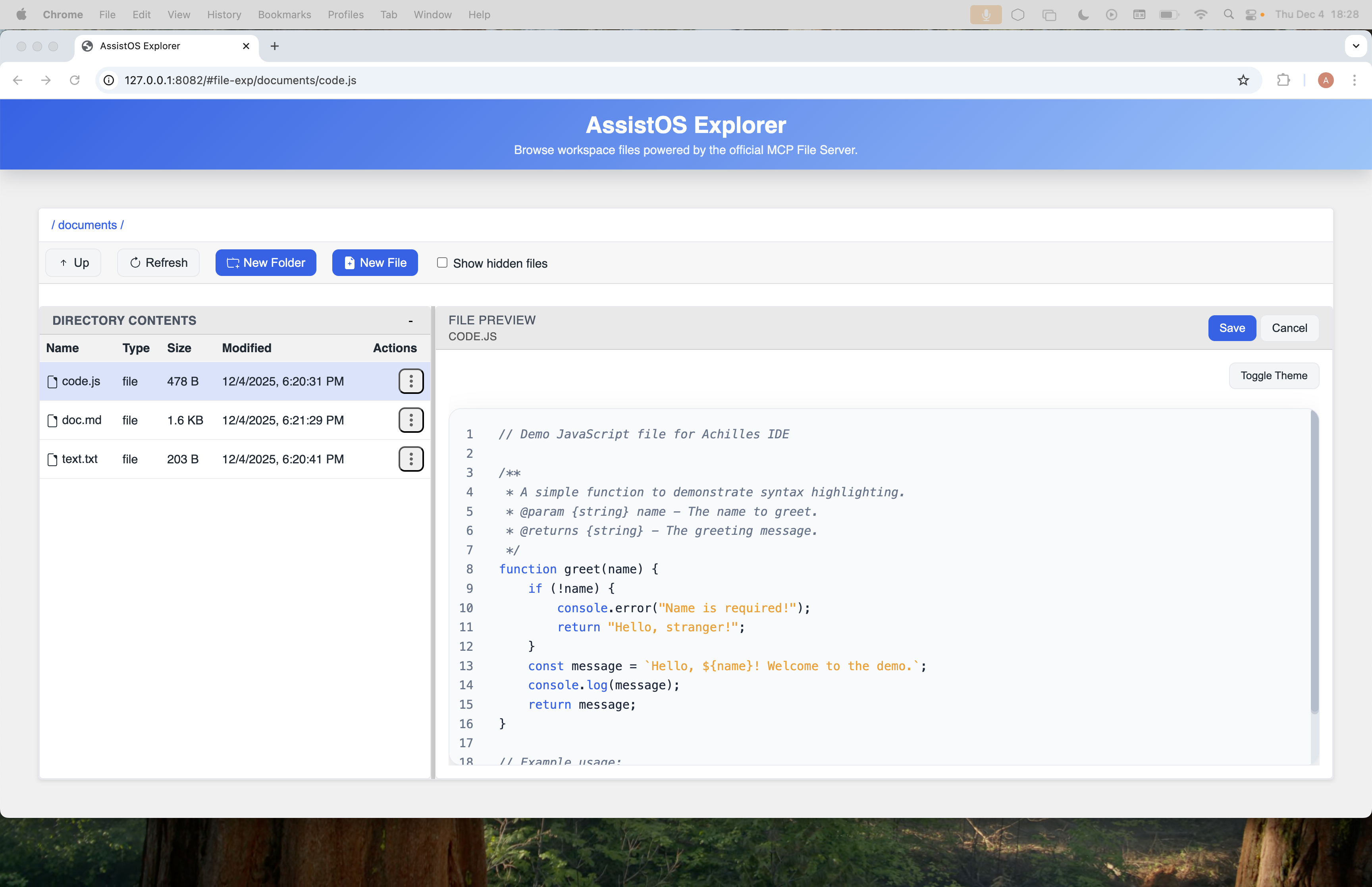
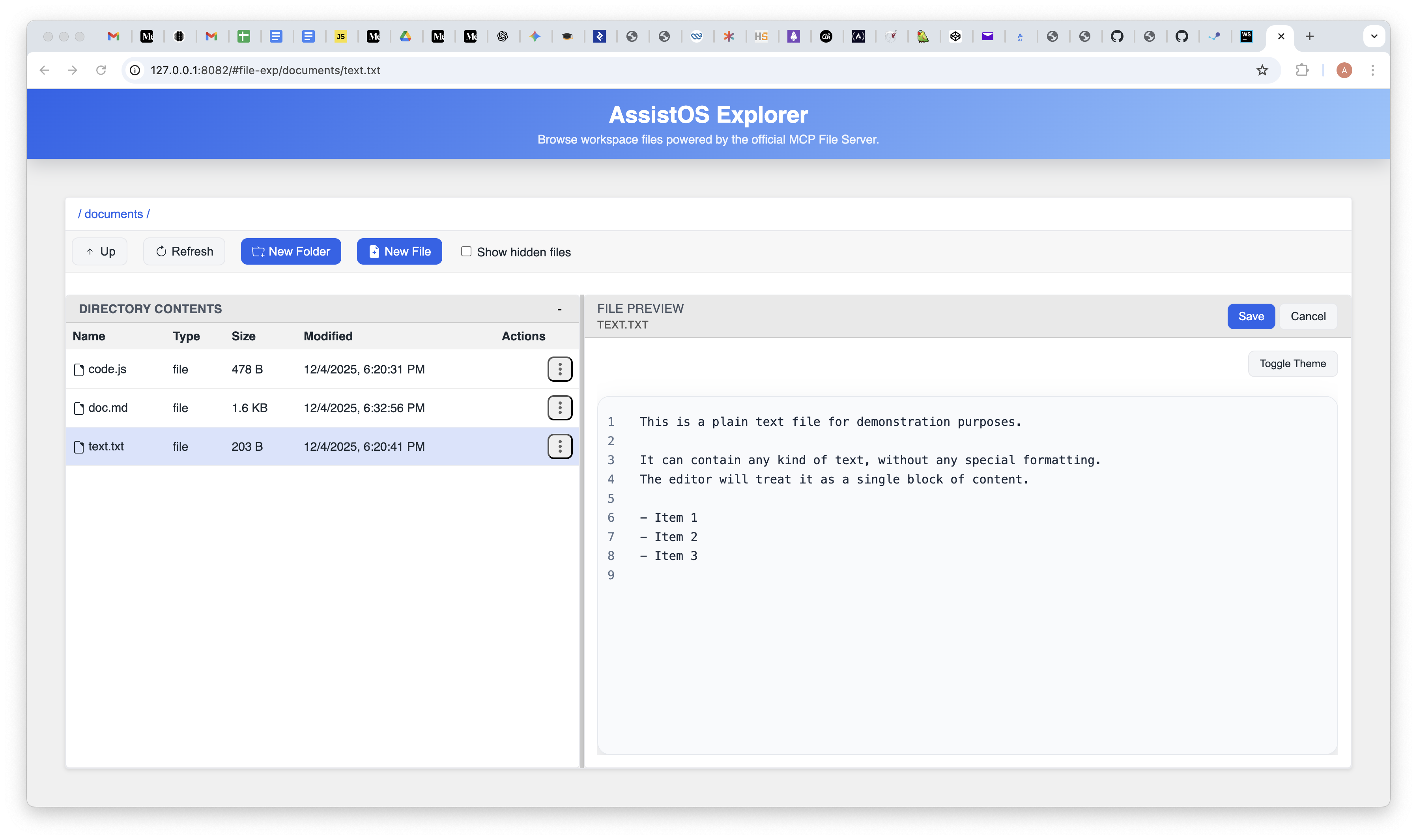
Document editing views (screens)
Visual examples of the structured Markdown editor and general editor modes.
Data Persistence via Soplang Commands
A key architectural concept is that .md files are a persistence layer for structured data. This is achieved by embedding soplang commands directly within the text, which are parsed during hydration and preserved during serialization.
Example: @media_image_123 attach id "blob-id" name "hero.png" embedded in a paragraph is kept verbatim in the file; the parser extracts it so the UI can render the image while the command stays in the Markdown.
Document Info
Each document contains a set of metadata that provides essential information about it. This includes the document's Title and a summary or abstract in the Info Text field. This data is managed within the document's metadata and can be edited through the UI to provide context for the document's content.
Example (metadata block):
<!-- {"achilles-ide-document":{"id":"L2RvY3VtZW50cy9kb2MubWQ=","title":"doc","infoText":"this is example document", ... }} -->Example (UI): In the info pane, set Title to "Release Notes" and Info Text to "Changelog for v1.2"; these values are saved back into the document metadata.
Table of Contents
The Explorer automatically generates a navigable Table of Contents for each document. This is handled by the contents-table component, which reads the document's structure from the hydrated data model.
The table is generated from the chapters array in the document model and uses each chapter's headingText and headingLevel to build an interactive outline.
Selecting an item in the Table of Contents scrolls the corresponding chapter into view.
Example:
## Table of Contents
- [Chapter 1: Introduction](#chapter-chapter-7ee41719-ab70-4cf2-9286-2a65534c9512)
- [Chapter 2: Advanced Features](#chapter-chapter-2)
Comments
The IDE supports a commenting system that allows users to attach feedback to the document as a whole, or to specific chapters and paragraphs. The comments-section component is responsible for displaying and managing these comments.
Comments live in the comments array within the metadata of the document, chapter, or paragraph they belong to, enabling collaborative review in context.
Example:
"comments": {
  "messages": [
    { "id": "CUZbVGCN", "userEmail": "local@example.com", "message": "demo comment" }
  ]
}
Add a paragraph-level comment like "Clarify API version" on the introduction; it is stored with that paragraph and shown inline in the comments panel.
References
A built-in reference management system allows you to cite sources and manage bibliographic information. The references-table component provides the interface for this feature.
References are stored in a references array within the document metadata, so citations remain centralized and reusable across the document.
Example snippet:
## References
1. Smith, J. R., & Doe, A. B. (2024). The Evolving Role of Machine Learning in Predictive Modeling.. International Journal of Technological Research,
2. Johnson, K. T. (2022). *Principles of Modern Data Structures and Algorithms.*. New York, NY.: Technical Press Inc..
Advanced Features: Snapshots, Tasks, and Variables
The document model also supports several advanced features for automation and version control:
Snapshots & Versioning: The version and snapshots properties provide lightweight versioning; the snapshots modal lets you view or revert states.
Tasks: The tasks property tracks to-dos associated with a document, surfaced through the tasks modal.
Variables: The variables property holds dynamic data consumed by SOPLang scripts and other automations; the variable details component lets you inspect and edit them.
Example: Capture a snapshot before major edits, add a task "Update diagrams" in the tasks modal, and define a variable releaseVersion=1.2.0 for SOPLang-driven templates.
Editing Other File Types (Text, Code, etc.)
In addition to its specialized Markdown editor, the Explorer Agent includes a general-purpose text editor for handling other file types. This allows you to view and edit a wide range of text-based files directly within the IDE.
Supported Files:
Plain text files (.txt), code files (.js, .html, .css, .py, etc.), and configuration files (.json, .xml, .yml, etc.) all open in the general editor.
Example: Open config/app.json to view or edit JSON; open src/main.js to edit code with syntax highlighting; both use the general editor (no document DOM).
The Key Difference: Plain Text vs. Structured Data
Plain Text Handling: When you open a .js or .txt file, it is treated as a single block of text; no chapters or paragraphs are parsed.
No DOM or Plugin Context: Non-Markdown files do not expose the structured DOM, so paragraph-level plugins or SOPLang commands do not apply the same way.
Underlying MCP Tools: Interactions rely on filesystem MCP tools such as read_text_file and write_file, providing raw, direct file access within allowed roots.
Syntax Highlighting
While these files are treated as plain text from a structural point of view, the editor provides a crucial presentation-layer feature: syntax highlighting. When you open a code file (e.g., .js, .html, .css), the editor automatically detects the language and applies color coding to keywords, strings, comments, and other language constructs.
This feature significantly improves readability and makes it easier to work with code, but it's important to remember that this is a client-side rendering enhancement. It does not change the fact that the underlying file is treated as a simple block of text, unlike the deep structural parsing applied to .md files.