Backend (MCP Explorer + SOPLang)
The Explorer backend has two pillars: the MCP filesystem server (in the Explorer container) and the
SOPLang automation engine (in the separate soplangAgent container). Both mount the same
workspace volume but serve different roles.
- MCP (Explorer): Serves filesystem-safe tools over
/mcp. EnforcesallowedDirectoriesderived fromASSISTOS_FS_ROOT/MCP_FS_ROOT. - SOPLang (soplangAgent): Executes SOPLang scripts, exposes explicit MCP tools
such as
sync_markdown_documentsandexecute_workspace_build, and runs document sync or the workspace build separately. - Shared workspace: Both containers see the same files; neither proxies to the other.
MCP (Explorer)
MCP stands for Model Context Protocol, a standard way for AI agents to call tools over structured JSON schemas; here it is used to expose filesystem-safe operations to clients like IDE integrations.
The MCP server lives in filesystem-http-server.mjs and exposes tools over the
/mcp endpoint. Every call is guarded by an allowed-roots whitelist; path arguments are
resolved and normalized before execution.
Endpoint: /mcp (plus /health);
Allowed roots: Derived from ASSISTOS_FS_ROOT / MCP_FS_ROOT (comma-separated). If missing, the server falls back to the root of the workspace -process.cwd()
Path resolution: Relative inputs are resolved inside the first allowed root; any traversal outside is rejected.
Error surface: Violations return MCP errors (e.g., “path outside allowed roots”); no implicit directory creation occurs beyond documented behavior.
Implementation highlights:
MCP core: Wraps @modelcontextprotocol/server-filesystem, the reference MCP filesystem server with read/write/list/move/copy/search tools and built-in path guardrails for IDE/desktop agents.
Static hosting: Serves WebSkel UI files and plugin assets straight from the repo; manifests can reference icons/assets without another server.
Plugin discovery: aggregateIdePlugins runs at startup and on collect_ide_plugins, scanning enabled repos for IDE-plugins/*/config.json, resolving assets, grouping by location, and returning a merged catalog.
Path enforcement: resolvePathsInArgs normalizes inputs and blocks anything outside allowedDirectories before delegating to the MCP server, keeping scans and filesystem tools inside whitelisted roots.
Blob uploads
Blob uploads follow the Ploinky router model (docs): UI helpers post to /blobs/<agent>, the router proxies that path to the agent, and the agent responds with JSON (id, localPath, optional downloadUrl). Explorer and soplangAgent use this convention; when wired through the router, uploads stream to the agent implementation without extra client changes.
What MCP Can Do
Tooling is grouped by capability rather than memorizing each handler name.
Read: Text files, media blobs, and small batches of files, with head/tail support.
Write & edit: Create or overwrite text/binary files, or patch existing files atomically.
Directory ops: List (simple, detailed, with sizes), traverse trees, and create folders recursively.
Move/copy/delete: Relocate or duplicate files/directories (optional overwrite) and delete safely within allowed roots.
Metadata & search: Stat/info lookups plus filename/content searches constrained to allowed roots.
Plugin discovery: Aggregate IDE-plugins/*/config.json across enabled repos for the UI catalog.
Introspection: List allowed directories to debug path issues.
Calls are stateless; the client sends absolute or relative paths, and the server validates them against the whitelist before touching disk.
MCP Example Call
// Request (read a file head)
{
  "method": "read_text_file",
  "params": { "path": "README.md", "head": 20 }
}

// Response (success)
{
  "content": "# Explorer Agent...",
  "truncated": true
}

// Response (error outside roots)
{
  "error": "Path is outside allowed directories"
}
Tip: prefer relative paths rooted in the first allowed directory to avoid ambiguity when multiple roots are configured.
What is SOPLang
SOPLang (Standard Operating Procedure Language) is the IDE’s automation/runtime layer. It runs in
soplangAgent (own container) and is invoked via explicit MCP tools such as
sync_markdown_documents and execute_workspace_build.
Role and execution
SOPLang executes scripted flows, maintains a dependency graph of variables, and persists structured document data. It shares the workspace volume with Explorer and is called directly (not proxied) by the UI over MCP. Commands can orchestrate other agents and mutate variables that the UI re-hydrates.
Embedding and state
Commands live inside Markdown comments or fenced blocks and are preserved on save. Variables you set in SOPLang (e.g., @set releaseVersion "1.4.0") become part of the document model; execution can mutate them, and a reload re-hydrates the updated state into the UI.
What happens on build
During syncMarkdownDocuments, parseDocsFromMarkdown reads achilles-ide-* comments and SOPLang commands (including variable assignments), builds templates, clears and reapplies chapters/paragraphs/metadata, then workspace.forceSave() persists the document store. executeWorkspaceBuild runs workspace.buildAll() separately. Variables and commands parsed from Markdown are stored with the document; subsequent SOPLang runs can update them, and hydration will reflect the latest values.
Persisted variables and commands ground AI flows: prompts or templates can inject these values, workflows can mutate them between runs, and the dependency graph keeps state consistent across LLM calls. When AI-driven plugins or scripts run, they read the same graph and feed results back so the next step (human or AI) sees updated context.
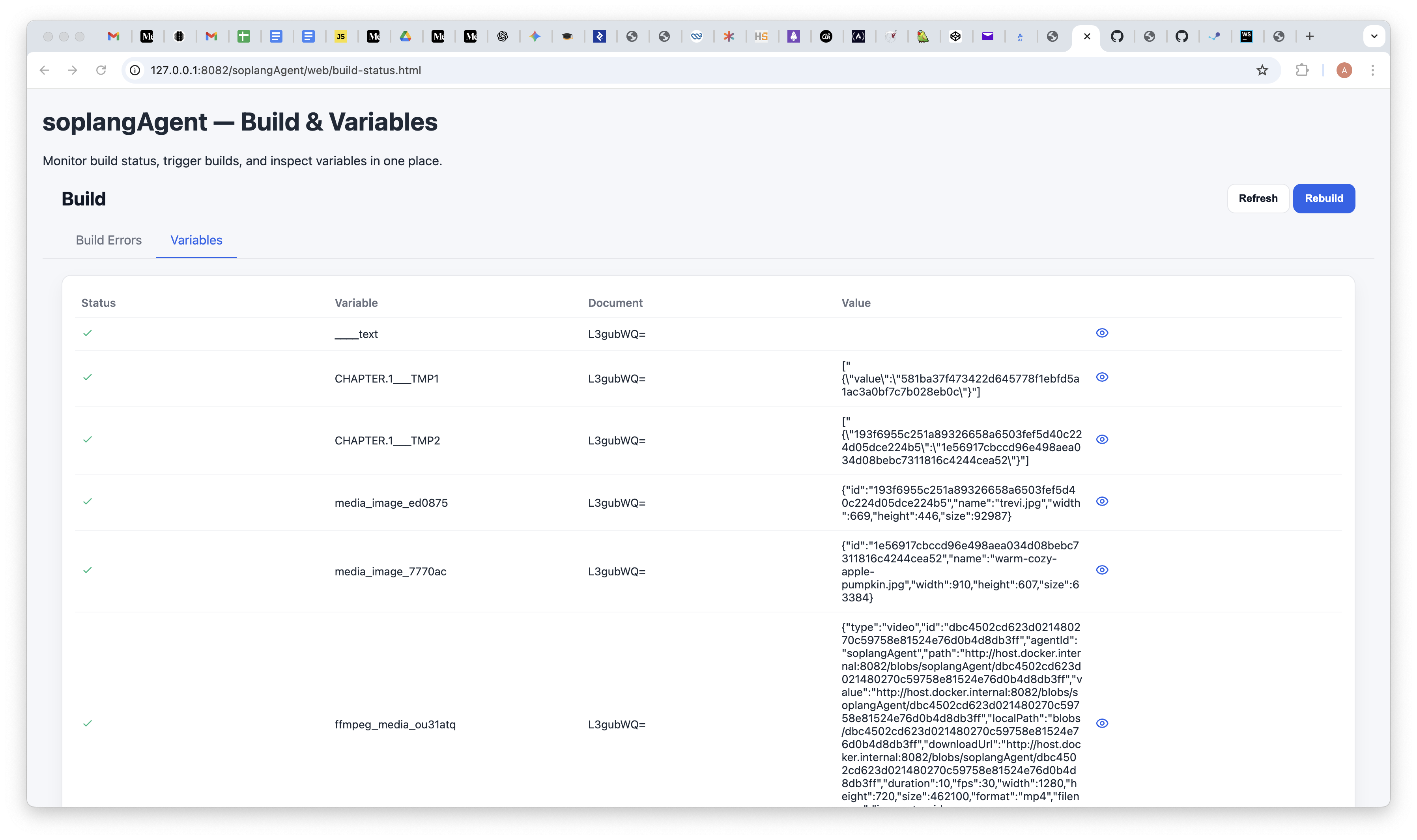
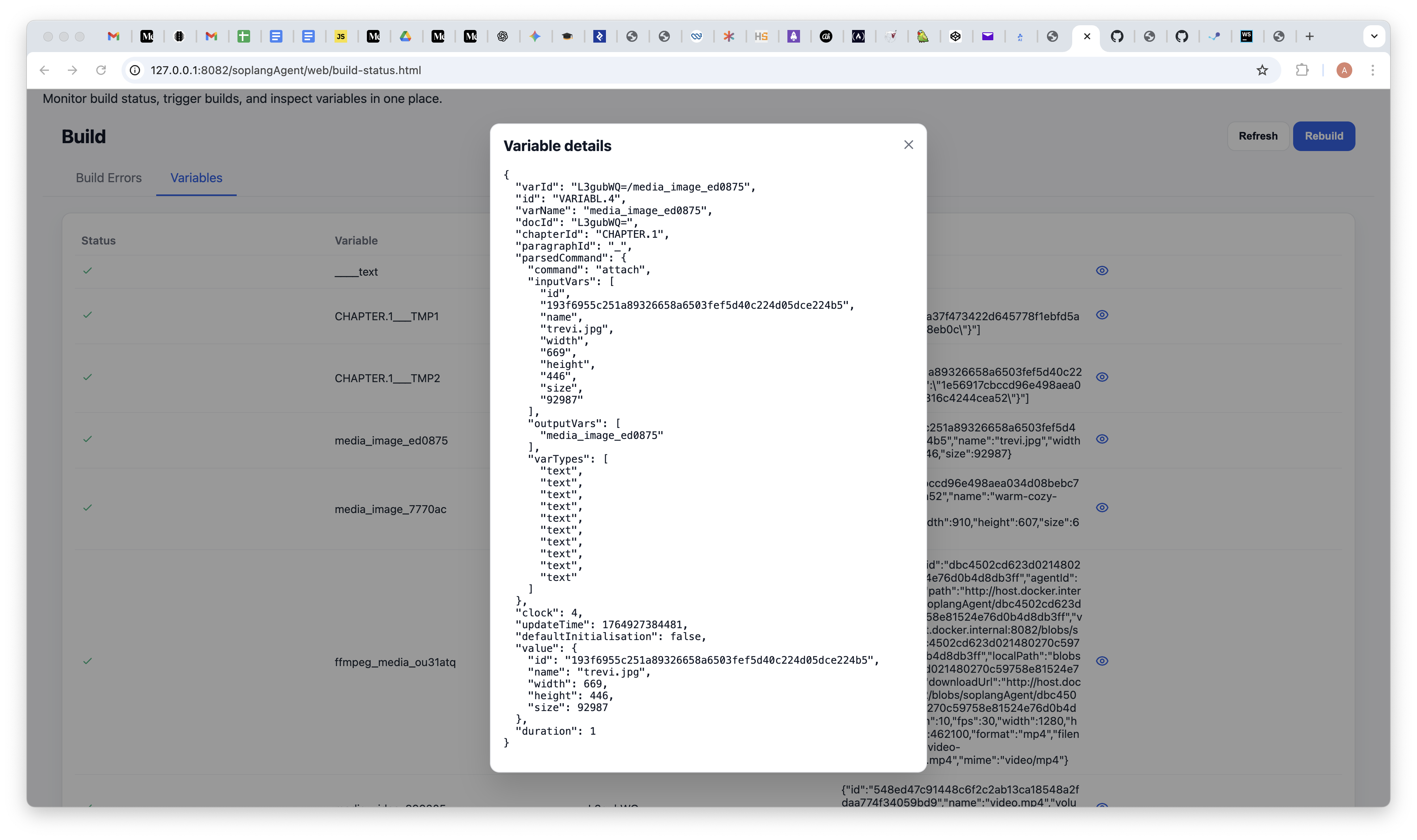
Screenshots below show the variables panel: initial state with no variables, the list after running a script, and the details for a single entry (keys/values and metadata) as rendered in the UI.
Variables UI

Embedding SOPLang
Use fenced code blocks in Markdown to keep scripts alongside content:
```soplang
# This is a SOPLang script
agent "MyAgent" do
  action "do_something"
end
```
Blocks are preserved verbatim; execution happens via explicit SOPLang MCP tools in soplangAgent.
Achilles comment markers
HTML comments map Markdown to the document model and keep SOPLang commands attached to structure:
<!--{"achilles-ide-document": {"id": "doc-1", "title": "My Doc"}}-->
<!--{"achilles-ide-chapter": {"title": "Intro", "commands": "@set title \"Intro\""}}-->
<!--{"achilles-ide-paragraph": {"title": "P1", "commands": "@media_image_123 attach id \"blob-id\""}}-->
Document: ids/titles and doc-level metadata.
Chapter: headings plus commands before a heading.
Paragraph: commands/metadata sitting above the paragraph text.
Variables & Commands
SOPLang keeps state as key/value variables and inlined commands. Common patterns:
@set releaseVersion "1.4.0"
@set doc_owner "alice@example.com"
@media_image_hero attach id "blob-id-123" name "hero.png"
Variables: Stored with the document model; after execution, reload/hydrate to see updates in the Variables panel.
Media commands: Store blob IDs (not URLs); the UI builds URLs at runtime.
Scopes: Commands can sit at document, chapter, or paragraph level via achilles-ide-* comments.
Execution from the UI
When a Markdown file contains SOPLang blocks/commands, Explorer surfaces run controls via soplangAgent.
Use document toolbar actions to execute the current SOPLang block or script.
Outputs appear in the IDE console; variable updates flow back into the document model—reload to re-hydrate.
After adding comment markers or commands, reload the document so hydration picks them up.
SOPLang Build (Markdown → Documents)
SoplangBuilder.syncMarkdownDocuments runs inside soplangAgent to sync
Markdown into the document store.
Pick workspace root: pickRoot() checks SOPLANG_WORKSPACE_ROOT or parent folders.
Discover Markdown: walkMarkdown(root) finds .md files, skipping build/dev dirs.
Parse structure: parseDocsFromMarkdown reads achilles-ide-document/chapter/paragraph comments and SOPLang commands into templates; commands are also parsed into the SOPLang variable graph.
Apply templates: Existing docs are cleared/synced; metadata, chapters, paragraphs, references, commands, and variables are applied, updating the graph definitions.
Persist: workspace.forceSave() writes synchronized document data to storage. executeWorkspaceBuild triggers workspace.buildAll() separately.
Invoke via MCP: methodName: "syncMarkdownDocuments", pluginName:
"SoplangBuilder" for sync, and methodName: "executeWorkspaceBuild" for the full build step. Logs: SOPLangBuilder/last-tool.log.
Troubleshooting
MCP errors: “Path outside allowed roots” means ASSISTOS_FS_ROOT/MCP_FS_ROOT is wrong or the path is outside the first allowed root.
SOPLang build fails: Check SOPLangBuilder/last-tool.log and ensure soplangAgent is enabled and running.
No Markdown picked up: Make sure achilles-ide-* comments exist and files aren’t inside skipped build dirs.
Variables not updated: After executing SOPLang blocks, reload to re-hydrate document state into the UI.