Architecture
Explorer is the static host shell of the workspace, not just another agent with a narrow tool surface. A Ploinky workspace needs one application that can own navigation, preview, editing, and runtime plugin mounting without absorbing the domain logic of Git, DPU, SOPLang, tasks, assistant flows, or media tooling. Architecture matters here because the product boundary is easy to get wrong: if Explorer becomes too thin, users end up stitching together unrelated agent surfaces; if it becomes too broad, domain rules drift into the host and become harder to maintain.
The implemented architecture answers that tension by keeping Explorer responsible for the shared IDE shell while dependent agents keep responsibility for permissions, state, and mutations in their own domains. Explorer therefore sits at the center of the workspace experience, but it is intentionally not the owner of every operation the workspace can perform.
Runtime Structure
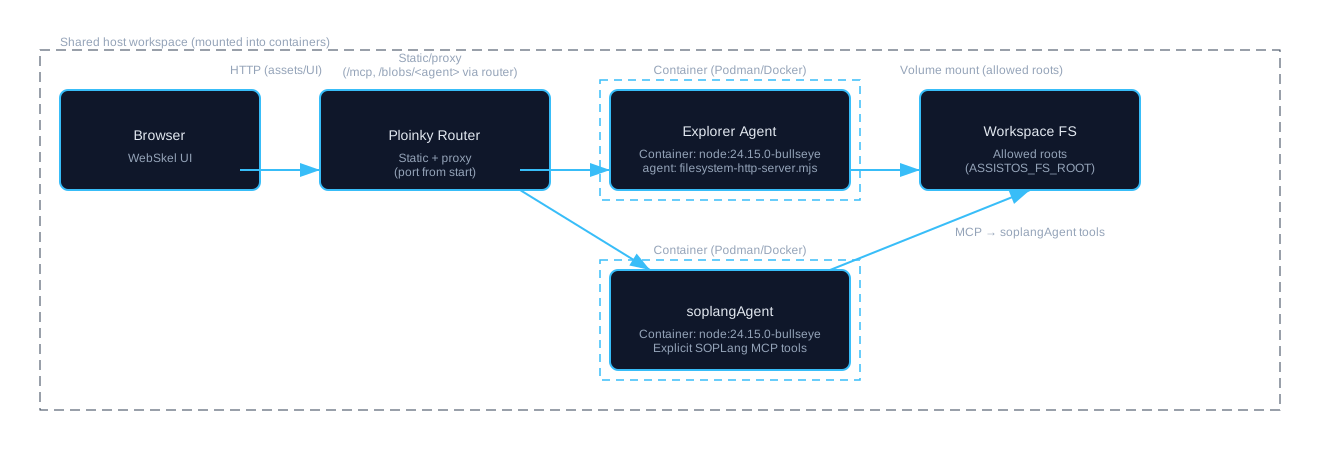
Explorer runs inside Ploinky, which provides the router, workspace routing table, agent lifecycle, and startup orchestration. Explorer is configured as the static agent, so the router publishes its UI on the workspace port while also proxying MCP traffic to the relevant agents. The Explorer container itself is defined by explorer/manifest.json, which declares the runtime image, command, environment, and the dependency agents that must be enabled alongside it.
At startup, ploinky start explorer applies Explorer manifest directives, starts the dependency agents declared in enable[] in parallel, and waits for readiness of those dependencies plus Explorer itself before reporting the workspace ready. That readiness model matters because Explorer is only useful as an IDE shell when the domain agents it surfaces are also available. The router may serve the UI, but the workspace is not treated as operational until the dependent services that back the active panels and flows have reached readiness as well.
This runtime relationship is asymmetric. Explorer owns the host UI and filesystem-facing shell, but agents such as gitAgent, dpuAgent, soplangAgent, tasksAgent, llmAssistant, and multimedia remain separate runtime units. For example, soplangAgent receives its own MCP calls for document synchronization and build execution and reads the mounted workspace directly; it is not a hidden module inside the Explorer backend.
Host Implementation
The Explorer implementation is split between the Node backend in filesystem-http-server.mjs and the browser application built with WebSkel. The backend serves static frontend assets, exposes filesystem-safe MCP operations, enforces allowed-directory constraints, and aggregates runtime plugin manifests from enabled agent or repo-local plugin folders. Application-category plugins are filtered through Explorer's applicationPlugins manifest policy before they are mounted into the browser experience.
On the frontend side, the SPA under explorer/ owns navigation, selection state, preview routing, editors, and runtime component loading. Ordinary Markdown source editing flows through the embedded markdown-editor component, while SOPLang-aware structured editing is opened explicitly through document-view-page. Other text and code files use the general-purpose editor components. HTML preview, media preview, and other content-aware experiences are orchestrated from the same host shell, which is why the frontend structure lives as a unified application rather than as a collection of unrelated agent UIs.
The boundary between these two layers is operational rather than theoretical. The backend provides the constrained file and plugin catalog surface the browser needs. The frontend decides how those resources become a coherent IDE experience. Where the browser needs a domain action, it invokes the owning agent instead of reimplementing the domain logic locally. That same separation explains blob behavior as well: the Ploinky router can proxy /blobs/<agent> to an agent that implements blob handlers, but the shipped filesystem-http-server.mjs does not itself implement that endpoint.
The application structure is declared in webskel.json, which lists the pages, components, and modals that make up the host shell. Representative components include:
| Component | Description |
|---|---|
file-exp |
The main page orchestrating the file explorer view. |
file-exp-entries |
Dedicated presenter for rendering and updating the entries table/list. |
file-exp-preview |
Dedicated presenter for preview area orchestration (code/media/markdown/html). |
html-web-view |
Sandboxed iframe presenter used by HTML preview (Code/Web/Split modes). |
document-view-page |
Renders a structured SOPLang-aware document with its chapters and paragraphs. |
markdown-editor |
Embeds TinyMDE for normal Markdown source editing and keeps the textarea value aligned with Explorer save flows. |
chapter-item / paragraph-item |
Represents a single chapter or paragraph within a document. |
file-editor |
A general-purpose text editor for any file type. |
files-menu |
Component responsible for displaying a browsable list of files and directories. |
insert-image-modal |
A modal for uploading and inserting images into a document. |
Each component is driven by a JavaScript presenter class that manages its state and lifecycle. Presenters use an invalidate() method to trigger re-renders, making the UI reactive to data changes.
Development Context
Explorer development happens inside a Ploinky workspace, not as a standalone web app detached from the rest of the runtime. That means local changes need to be understood in the same environment where the router, dependency agents, and workspace mounts are present. Install Node.js 20+ and npm, enable the repo and global Explorer agent, and point the filesystem root to the workspace you want Explorer to expose.
From the workspace root, the normal startup path is:
ploinky enable repo AchillesIDE
ploinky enable agent AchillesIDE/explorer global
export ASSISTOS_FS_ROOT=<path-to-workspace>
ploinky start explorer 8080
# Dashboard: http://127.0.0.1:8080/dashboard
# Main Explorer UI: http://127.0.0.1:8080/#file-exp/
Global mode matters because Explorer is meant to mount and browse the current workspace, not only its own isolated agent workdir. Runtime plugins are discovered from enabled agent-owned IDE-plugins/ directories in the workspace, and application plugins are filtered by Explorer's applicationPlugins policy from explorer/manifest.json. If you change a plugin config.json or add a new plugin, restart Explorer so discovery runs again. Most ordinary UI, JS, and CSS changes are then visible through a normal browser refresh.
For local orientation, the repository layout relevant to the Explorer host is:
.../AchillesIDE/
├─ explorer/
│  ├─ filesystem-http-server.mjs   # Backend: MCP, static hosting, plugin discovery
│  ├─ index.html / main.js         # SPA entry point
│  ├─ webskel.json                 # Core UI components
│  ├─ web-components/              # Component implementations
│  ├─ services/                    # Frontend services, parsing, document store
│  └─ utils/                       # Shared utilities
├─ dpuAgent/IDE-plugins/        # DPU UI/runtime plugins
├─ gitAgent/IDE-plugins/        # Git UI/runtime plugins
├─ multimedia/IDE-plugins/      # Media creation and preview plugins
├─ soplangAgent/IDE-plugins/    # SOPLang actions and variable editor
└─ tasksAgent/IDE-plugins/      # Backlog/task plugins
HTML Web Preview uses repo-scoped paths such as /.ploinky/repos/AchillesIDE/docs/development.html. Plugin-specific authoring and manifest details are documented separately in the Plugins guide.